
VendorLens

    Lightweight vendor assessments for teams without a TPRM programme

    Someone asks which suppliers hold your customer data, and the answer lives in a spreadsheet, a procurement thread and two people’s memories.

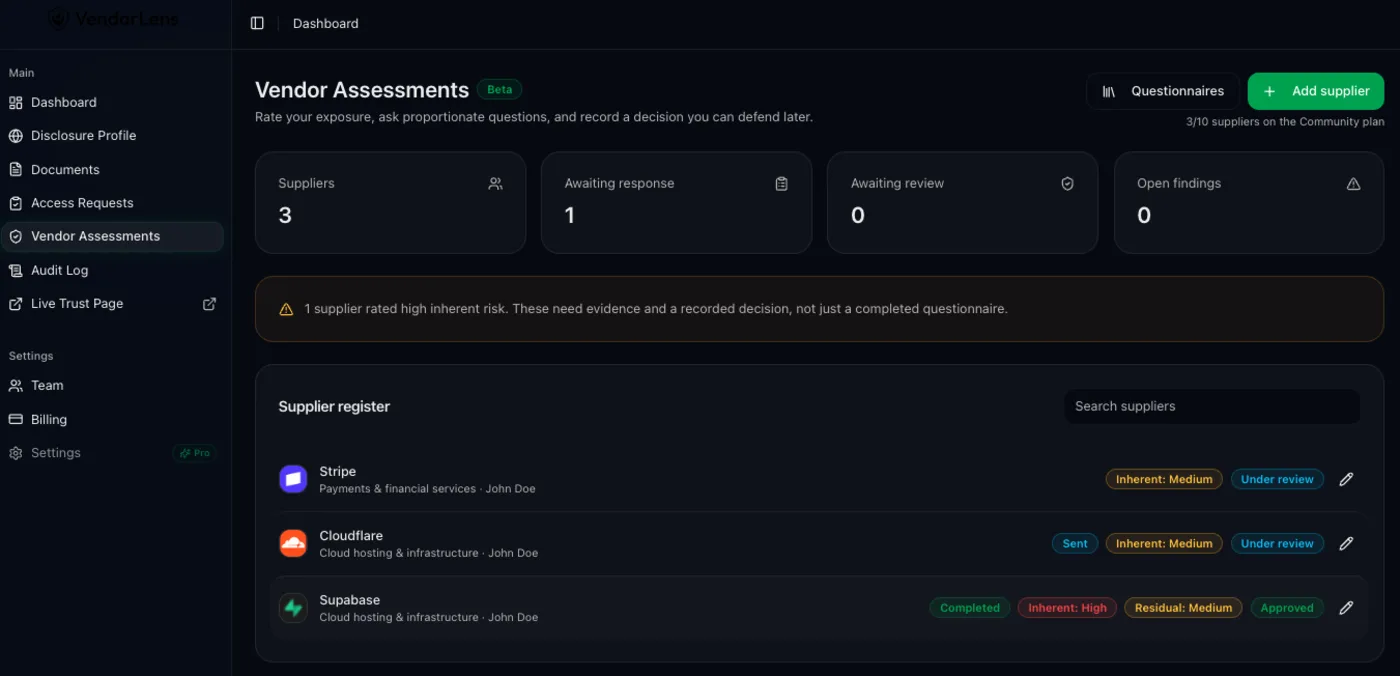
    Vendor Assessments (Beta) gives you a supplier register, an explainable inherent-risk rating, a short questionnaire you actually send, evidence collected through an expiring link, and a recorded decision with its rationale and next review date. Included on every plan — the free plan covers up to 10 suppliers.

    Lightweight vendor assessments for teams without a TPRM programme — VendorLens trust portal screenshot

    Use cases

    Know who your suppliers are

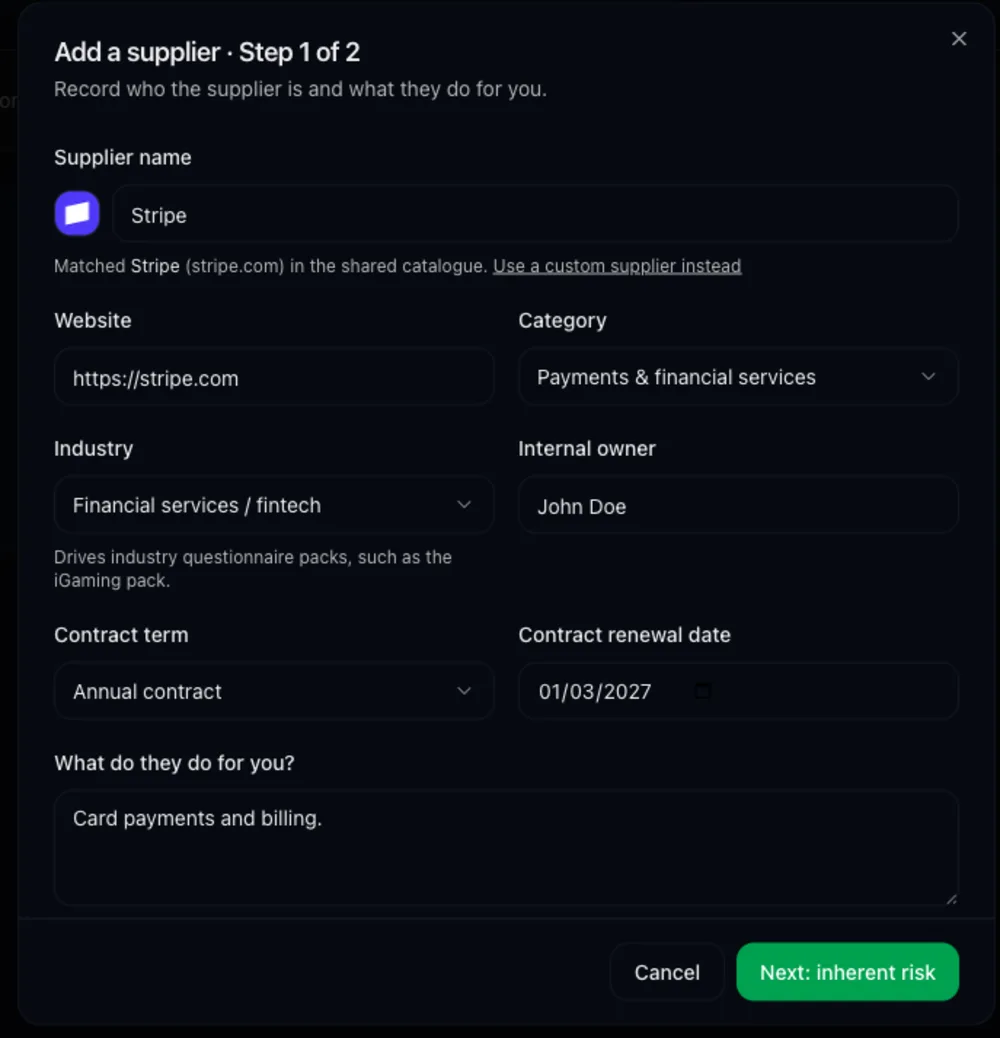
    One register of the suppliers you depend on, with owner, category, industry, contract term and criticality. Common suppliers autocomplete from a shared catalogue with their logo, so the register stays consistent instead of holding four spellings of the same vendor.

    Score exposure before you send anything

    6 exposure questions produce an inherent-risk rating that is scored server-side, with the contributing factors shown. Low-exposure suppliers do not need the same scrutiny as the one processing your customers’ personal data.

    Send a questionnaire that gets finished

    The recommended pack is 10–12 questions of Lightweight Core plus only the add-ons the exposure answers justify: Personal Data add-on, Critical Service add-on, Payments add-on, iGaming add-on. Short questionnaires come back; 300-row spreadsheets do not.

    Collect evidence without an email thread

    The supplier gets an expiring link with autosave, uploads evidence against eligible questions, and you can ask for clarification inline. Uploads are size-limited and structurally inspected before they are accepted.

    Record the decision, not just the answers

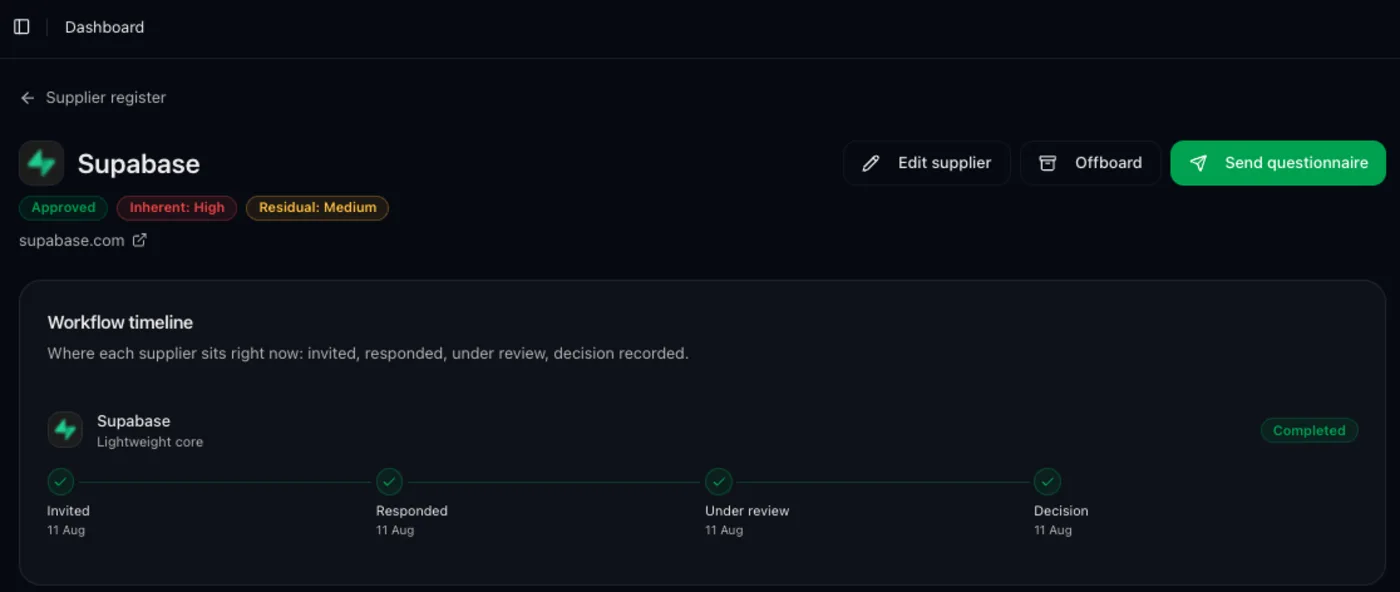
    Approve, approve with conditions or reject, with the rationale, residual risk and a next review date. Reassessment carries the previous answers forward so the second round is a review, not a rewrite.

    Answer the question your auditor asks

    Because each assessment carries its questionnaire, evidence, decision and timestamps, "show me how you reviewed this supplier" has an answer you can export rather than reconstruct.

    How it works

    1

    Add the supplier

    Search the shared catalogue or type any name to create a custom supplier. Set owner, category and criticality.

    2

    Answer the exposure questions

    6 questions about data, access, criticality and payments. You get an inherent-risk rating and a recommended questionnaire pack.

    3

    Send the assessment

    The supplier contact receives a link scoped to that assessment. Reminders are rate-limited, and tokens rotate rather than living forever in an inbox.

    4

    Review answers and evidence

    Accept answers, request clarification on the weak ones, and read the uploaded evidence. Every state change is recorded with the actor.

    5

    Decide and set the review date

    Approved, Approved with conditions, Rejected — with rationale, residual risk and when you will look again.

    Manual process vs VendorLens

    TopicManual processWith VendorLens
    Supplier listSpreadsheet, usually staleRegister with owner, criticality and review dates
    Deciding how deep to goGut feel per supplierInherent risk scored from 6 exposure questions, factors shown
    QuestionnaireA copied spreadsheet nobody returnsSource-controlled packs sized to exposure
    EvidenceEmail attachmentsUploads against questions, inspected and stored with the assessment
    DecisionA Slack messageRecorded outcome, rationale, residual risk, next review date
    ReassessmentStart again from scratchPrevious answers carried forward for review

    Why small teams end up with no supplier process at all

    Third-party risk tooling is generally built for programmes: a risk register, a scoring model, a remediation workflow and someone whose job it is to run them. A twenty-person company has none of that, so supplier review becomes an ad-hoc email whenever a customer, insurer or auditor asks. The work is not skipped because it is unimportant; it is skipped because the available tools assume a team that does not exist. Vendor Assessments takes the parts that matter at that size — knowing who your suppliers are, sizing scrutiny to exposure, asking a short set of questions, keeping the evidence, and writing down the decision — and leaves out the programme machinery.

    Sizing scrutiny to exposure

    Not every supplier deserves the same questionnaire. A design tool with no customer data and a payment processor holding cardholder flows are different problems, and sending both the same 200-row spreadsheet gets neither answered well. The 6 exposure questions ask what the supplier touches: personal data, production access, business criticality, payments, sub-processing, jurisdiction. The resulting rating is computed server-side and shows its factors, so you can defend the depth you chose — and so a low-risk supplier can be approved quickly instead of stalling behind a review nobody has time for.

    What "Beta" means here

    Beta means the feature is in production, used by customers, and still changing: question packs, decision gates and the reassessment flow have all moved in response to how teams actually work. It does not mean sample data or a waiting list. Your suppliers, answers, evidence and decisions are real records under the same access controls as the rest of your account, and they carry forward as the feature develops.

    Frequently asked

    What are Vendor Assessments?

    Vendor Assessments (Beta) is the supplier-facing half of VendorLens: a supplier register, inherent-risk scoring, questionnaires you send to your own suppliers, evidence collection through an expiring link, and a recorded approval decision.

    Which plans include Vendor Assessments?

    All of them. The free plan covers up to 10 suppliers; Pro and Business have no supplier cap. It is labelled Beta because the workflow is still changing based on how teams use it.

    Is this a full third-party risk management platform?

    No. There is no continuous monitoring, no security ratings or external risk feeds, no fourth-party mapping and no programme-level remediation management. It is sized for teams assessing tens of suppliers, not hundreds.

    When should I buy a full TPRM platform instead?

    You manage hundreds of suppliers and need a full risk register with programme-level reporting. You need continuous monitoring, security ratings or external breach and financial feeds. You need fourth-party mapping, remediation programme management or SLA-driven workflows. You need deep integration with an enterprise procurement or GRC stack.

    Do suppliers need a VendorLens account?

    No. They open a link scoped to their assessment, answer in the browser with autosave, and upload evidence. Nothing to install and no account to create.

    Does VendorLens answer questionnaires that customers send to me?

    No. It does not auto-fill inbound questionnaires and holds no AI answer library. What it does is publish your evidence on a trust center up front, which is what reduces how many arrive.

    How does this relate to the trust center?

    They are two sides of the same problem. The trust center is how you answer your customers’ security reviews; Vendor Assessments is how you run the same review on your own suppliers. Both are in one account.

    Ready to assess your suppliers?

    Start free — the Community plan covers up to 10 suppliers, with questionnaires, evidence and recorded decisions included.