VendorLens

    Trust Center Software for SaaS Startups

    Buyers ask for SOC 2, ISO 27001, DPAs and policies before they sign. Sending them by email is slow, hard to track, and leaks sensitive material to laptops you do not control.

    VendorLens is trust center software built for SaaS startups & SMBs and small B2B teams that already have their security documents. Publish a branded portal on your own domain, gate sensitive material behind NDA, and stop chasing PDFs over email — starting at $0 with custom domains from $99/month.

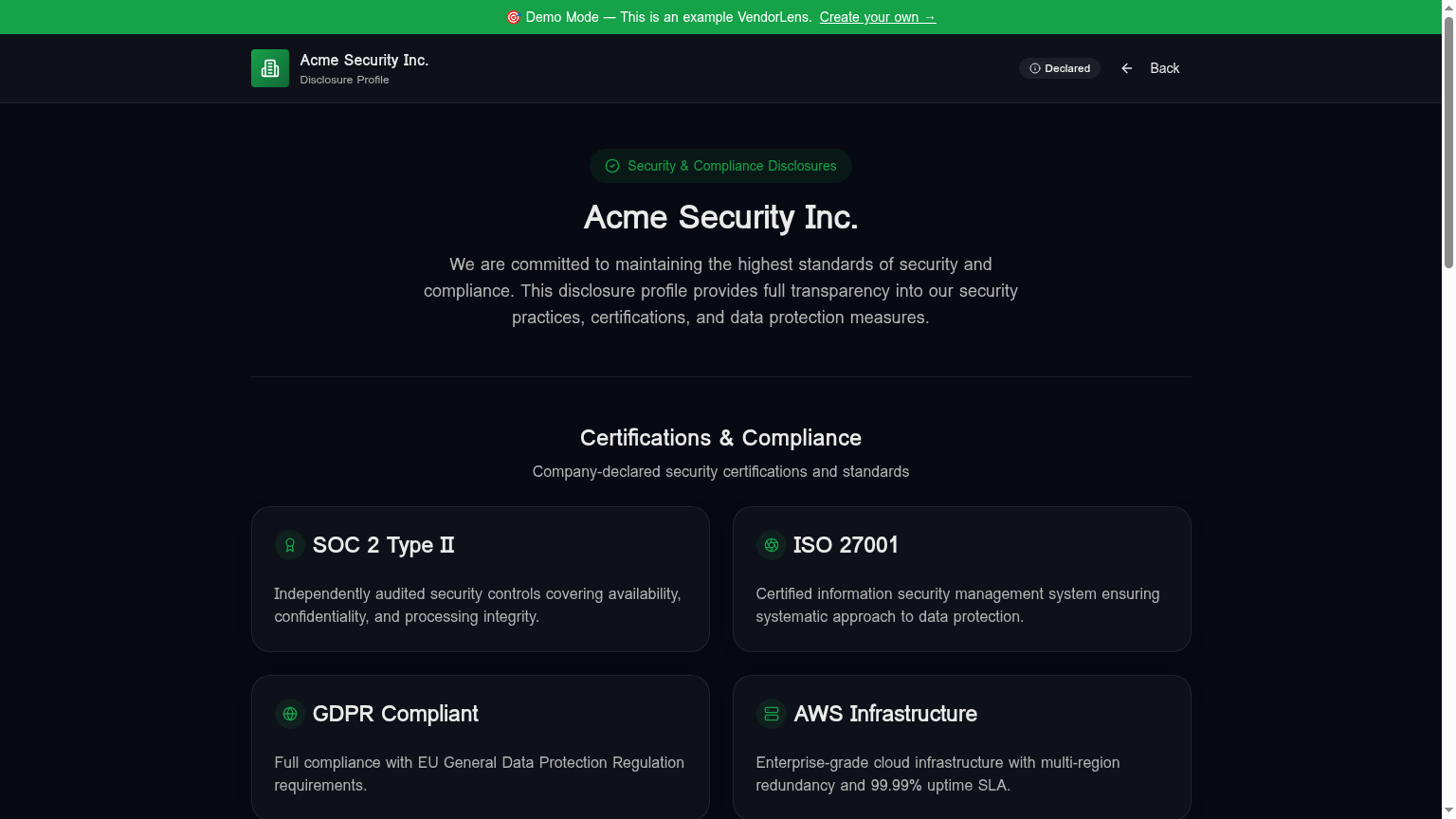
    Trust Center Software for SaaS Startups — VendorLens trust portal screenshot

    Use cases

    Replace the "send me the SOC 2" email loop

    Direct every buyer to one durable link. Public docs are downloadable; sensitive ones sit behind an NDA workflow with watermarked downloads.

    Shorten security review cycles

    Most security questionnaires can be answered with documents you already have. A trust center makes them findable and self-serve.

    Signal maturity early in the deal

    A branded trust portal on your own domain tells procurement you take security seriously before they have to ask.

    How it works

    1

    Upload your existing documents

    SOC 2 report, ISO 27001 certificate, DPA, pen test summary, security and privacy policies — anything you already have as a PDF.

    2

    Set visibility per document

    Public, NDA-required, or internal-only. NDA-gated docs require an approved request before access.

    3

    Publish on your domain

    Use vendorlens.io/trust/your-slug for free, or your own custom domain on Pro ($99/month) and Business plans.

    4

    Share the link in every deal

    Send the same link to every buyer. Track who views and downloads what in the audit log.

    Manual process vs VendorLens

    TopicManual processWith VendorLens
    Sharing the SOC 2Email the PDF to each buyer individuallyOne trust portal link with NDA gating
    Tracking who saw whatNo record after the email is sentPer-document audit log with timestamps
    Revoking accessImpossible — the PDF is on their disk foreverTime-limited signed URLs, watermark on download
    Updating a policyResend to everyone, hope they replace itReplace the file in the portal — the link stays the same
    BrandingLooks like an attachment in an inboxYour domain, your colors, your logo
    CostFree, plus hours of security and sales time per dealFrom $0 to publish; $99/month for a custom domain

    Why SaaS startups & SMBs need trust center software (not another GRC tool)

    If you sell to other businesses, you have already noticed the pattern: every deal above a certain size now comes with a security review. The buyer asks for your SOC 2 report, your ISO 27001 certificate if you have one, a DPA, a subprocessor list, a pen test summary, and sometimes a 200-row questionnaire. The deal does not move until they have all of it.

    For early-stage SaaS teams this creates an uncomfortable choice. Option one is to keep emailing PDFs and answering the same questionnaire by hand, which costs a few hours of senior engineering or security time per deal and leaves your most sensitive documents scattered across buyers' inboxes. Option two is to buy a full GRC platform — Vanta, Drata, Secureframe — at $8k–$20k per year, even though you already have the certifications and you do not actually need help becoming compliant. You just need help communicating it.

    Trust center software is the third option. It is the customer-facing layer for the documents you already maintain: one branded portal, on your own domain, with the right access controls per document. You keep the GRC budget for when you actually need control monitoring, and you stop losing days of cycle time to email threads about attachments.

    VendorLens vs manual document sharing

    Manual sharing — email, Drive links, Notion pages — is the default in most early-stage B2B teams, and it is the wrong default once you start closing deals with real procurement teams.

    Every emailed PDF is a PDF you no longer control. There is no expiry, no watermark, no audit trail, and no way to update the document for buyers who already have an old copy. Drive links are slightly better but they leak through forwarded calendar invites and screenshots, and they still do not give you per-buyer visibility.

    A VendorLens trust center fixes the structural problems. Sensitive documents sit behind an NDA workflow, so the buyer signs before they see the file. Downloads are time-limited and watermarked with the requester's name and email on every page, so a leaked PDF is traceable. Replacing a policy is one upload — every link your sales team has ever sent keeps pointing at the latest version. And every view, request, approval and download is logged with a timestamp, which is exactly the artefact your own auditor will ask for when they review how you handle customer-facing distribution of confidential reports.

    The second-order effect is what most teams underestimate: sales stops pinging security on every deal. A buyer who can self-serve the SOC 2, the DPA and the subprocessor list rarely needs a human in the loop at all, and the deals that do need a human are pre-qualified — the buyer has already read the material and has specific questions.

    VendorLens vs full GRC platforms (Vanta, Drata, Secureframe)

    GRC platforms and trust center software are often confused because both touch the word "compliance", but they sit in different parts of the stack and solve different problems.

    A GRC platform like Vanta or Drata is an internal tool for your security and compliance team. Its job is to help you become compliant: pulling evidence out of AWS and Okta, monitoring controls, mapping them to SOC 2 or ISO 27001 criteria, and preparing for the next audit. The output is a clean audit, a stamped report, and a set of policies. The audience is your auditor.

    A trust center is an external tool for your buyers. Its job is to publish the outputs — the report, the policies, the subprocessor list — through a portal that signals trust and removes friction from security reviews. The audience is procurement, IT and security teams at companies considering buying from you.

    Most mature B2B vendors eventually run both. But if you are a SaaS startup that has already passed a SOC 2 — or is using a fractional CISO and a managed audit firm to get there — adding a $15k/year GRC platform on top is rarely the highest-leverage spend. A $99/month trust center on your own domain pays back faster, because it directly compresses the sales cycle on every deal you are already in. The GRC platform compresses your next audit, which is months away.

    If you do not yet have your core documents, start with the GRC platform. If you already have them, start with the trust center and add a GRC platform when control monitoring becomes the bottleneck.

    What a VendorLens trust center looks like in practice

    A live VendorLens trust center has four parts. A header with your logo, brand colors, and a short security statement. A Certifications section showing the SOC 2 badge, the ISO 27001 badge if you have one, and any other attestations. A Documents section grouped by purpose — Reports, Policies, Subprocessors, Pen Tests — with the right visibility tier per file. And a Subprocessors table listing the vendors you use to deliver the service, with their location and purpose.

    For public documents — the DPA, the security overview, the subprocessor list — the buyer clicks and downloads. For NDA-gated documents — the SOC 2 report, the pen test, the full ISO 27001 statement of applicability — they click "Request access", fill in name, work email and company, sign your NDA (built-in template, your own text, or DocuSign / SignNow on paid tiers), and receive a watermarked, time-limited download once you approve. The whole loop, from a buyer landing on the page to a watermarked SOC 2 in their inbox, takes minutes instead of days.

    On the seller side, the dashboard shows pending requests, recent views, top-downloaded documents, and an exportable audit log. Sales sends one link in every deal. Security approves requests in batches. Both teams get the data they need without forwarding emails to each other.

    See a live example on our demo trust portal, or read the security document portal page for a deeper look at the document vault, and the vendor due diligence portal page for how the audit log and questionnaire response library fit together.

    Frequently asked

    What is trust center software?

    Trust center software gives B2B vendors a single, branded place to publish their security, privacy and compliance documents — and gate the sensitive ones behind an NDA workflow — instead of emailing PDFs to every prospect. A typical trust center hosts your SOC 2 or ISO 27001 report, DPA, subprocessor list, pen test summary, and a description of how you handle data. Buyers self-serve answers and download policies without pinging your security team, sales sends one durable link instead of attachments, and you get an audit log of every view and download. The category overlaps with GRC tools like Vanta or Drata but solves a different problem: GRC tools help you become compliant, trust center software helps you communicate that compliance to the outside world.

    Do I need to be SOC 2 certified to use VendorLens?

    No. Many SaaS startups & SMBs stand up a VendorLens trust center months — sometimes years — before they have a SOC 2. In the early stages you can publish a security overview, your privacy policy, your DPA, a subprocessor list, and a written response to the most common security questionnaire items. That alone unblocks the majority of small and mid-market deals, where buyers want to see that you have thought about security but do not require a third-party audit yet. When the SOC 2, ISO 27001 or pen test report does land, you add it to the existing portal under NDA and the link your sales team has been sending all year keeps working. Our SOC 2 guide walks through the typical sequencing.

    Is this a GRC platform like Vanta or Drata?

    No, and the distinction matters when you are choosing tools. GRC platforms (Vanta, Drata, Secureframe, Thoropass) automate evidence collection, control monitoring and audit preparation — they help you become compliant, and they typically start at $8,000–$20,000 a year. VendorLens is the customer-facing surface for the artefacts you already maintain: the SOC 2 report, the policies, the DPA, the subprocessor list. Most serious vendors end up running both: GRC inside the company to manage controls, VendorLens outside the company to communicate them. If you only have budget for one and you already have your core documents, a trust center delivers faster impact on revenue cycle time than another internal compliance tool.

    Can buyers download documents securely?

    Yes, and you control how. Documents on a VendorLens trust center have three visibility tiers. Public documents (DPA, subprocessor list, security overview) download directly with no friction. NDA-gated documents (SOC 2, pen test) sit behind a request workflow: the buyer fills in name, email and company, signs your NDA inline or through DocuSign / SignNow, and receives a time-limited signed URL once you approve. The downloaded PDF is watermarked with the requester's name and email diagonally across every page. Internal-only documents stay private to your team. The choice is per document and you can change it any time without breaking existing links.

    How long does it take to set up a trust center?

    Most SaaS teams have a usable trust center live in under an hour. Sign up, drag the PDFs you already have into the document vault, set visibility per file, group documents into sections (Certifications, Policies, Subprocessors, Pen Tests), and publish on a vendorlens.io URL immediately. Custom domains and brand colors add maybe another twenty minutes on Pro or Business. The slow part is usually internal: deciding which documents to share, what to keep behind NDA, and getting sign-off from your security lead. Most customers iterate from a minimal v1 published this week to a polished v2 over the following month, rather than waiting for a "perfect" launch.

    Ready to publish your trust center?

    Start free, or talk to us about the design partner program.